
Draco & Meshopt encoding
Two industry-standard geometry codecs: Draco for the smallest possible files, Meshopt for fast GPU decoding and full animation and morph-target support.
Compress heavy GLB models in the browser, then judge the result against the original side by side – with nothing kept on our servers.
Overview
Shrink Model is our own product, live and open to anyone at shrinkmodel.com. Drop in a self-contained GLB 2.0 file up to 500 MB, choose Draco or Meshopt, tune how far the textures are pushed, and the optimized model comes straight back – no plugins, no desktop software, no command line.
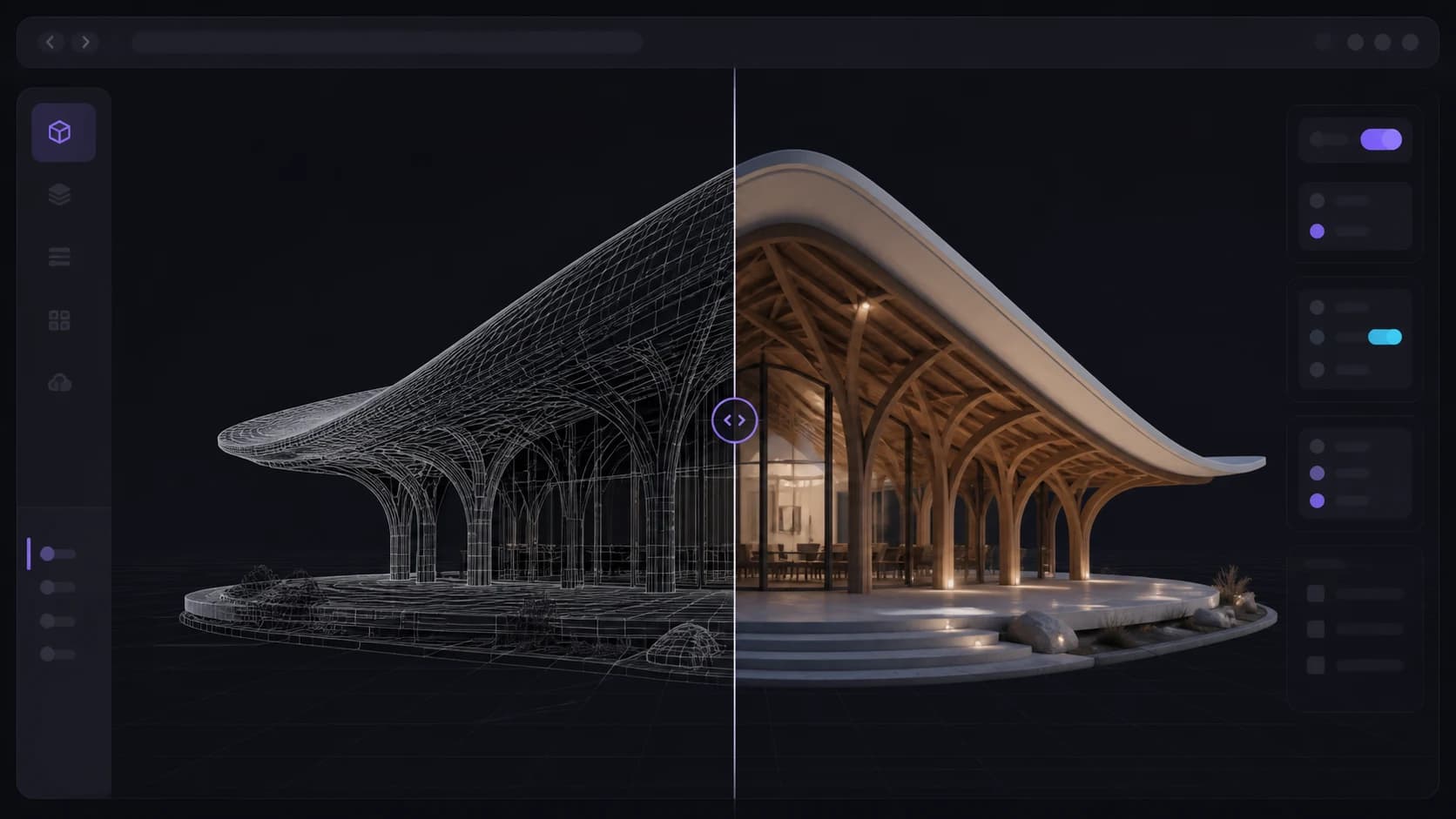
What matters is what happens next. The original and the compressed model load into a single scene split down the middle, driven by two synchronized cameras, so the cost of every setting is something you look at rather than guess at. On desktop you can drop into first person and walk the compressed model at human scale – the check a static thumbnail can never give you.
And nothing is kept. The API streams the compressed GLB back and deletes its own copy before the response finishes; your browser holds the only copy that exists, stored in IndexedDB so it survives a reload.
Production GLB assets routinely run to hundreds of megabytes, and every 3D pipeline eventually hits the same wall: the web needs them smaller, and shrinking them is a leap of faith. The number goes down, but nobody can say what it cost until the model is back in a scene.
The existing tooling makes that worse rather than better. Command-line glTF tools hand you a percentage and no picture. Desktop suites are heavy installs. The browser tools that do exist ask you to upload the asset and simply trust that it gets deleted afterwards.
A single-frame preview proves nothing either. Judging compression means holding the result against the original at the same camera, at the same moment – and for environments and interiors, at walking height, because that is where a lost silhouette or a blurred texture actually shows up.
We built the compressor on the glTF-Transform toolchain rather than wrapping a CLI. Every model runs through dedup, prune, and weld to clean the document, then either Draco – edgebreaker, with position, normal, and UV quantization tuned per level – or Meshopt encoding, before sharp optionally re-encodes the textures to WebP at a chosen quality and maximum dimension.
Every output is validated before it is allowed out. The service re-reads the file it just wrote and checks the GLB container header, that meshes and scenes survived the pipeline, that no accessor holds a non-finite value, that the compression extension you asked for is genuinely present, and that every texture really is WebP. A file that fails any of those checks is deleted instead of delivered.
Zero retention is a design constraint here, not a policy page. The compressed file is streamed to the client and unlinked as the stream settles – whether it completed, errored, or the user cancelled the download halfway – and the upload is deleted in the same request. A scheduled sweep exists only to catch orphans left behind by a crashed process.
Comparison is the other half of the product. Both models load into one Babylon.js scene under separate layer masks, with two orbit cameras sharing a single engine: one viewport shows the original, both shown together give the split view, and a free camera takes over for first-person exploration. Babylon itself is code-split, so it is only fetched once a preview is actually needed.
The compression pipeline, the guarantees around it, and the viewer that proves the result.
01/08
Two industry-standard geometry codecs: Draco for the smallest possible files, Meshopt for fast GPU decoding and full animation and morph-target support.
Light, Balanced, and Maximum move quantization, texture quality, and resolution together – then every one of those settings stays adjustable on its own.
Textures are re-encoded to WebP at a chosen quality and capped at 512px through 4K, or left untouched – usually the single largest saving in a GLB.
Every output is re-opened and checked – container, meshes, scenes, finite accessor data, compression extension, texture format – before a single byte is streamed back.
Original and compressed render side by side in one scene under synchronized cameras. It works as a plain GLB viewer too, on files you never compress.
Step inside the model and walk it at human scale – how environment and interior creators actually judge whether their detail survived.
The upload and the result are both deleted inside the request. There is no bucket and no download URL – your browser keeps the only copy, in IndexedDB.
Email or Google sign-in with HTTP-only JWT cookies. A file chosen before signing in is restored and compressed automatically once you land back.
Two industry-standard geometry codecs: Draco for the smallest possible files, Meshopt for fast GPU decoding and full animation and morph-target support.
Light, Balanced, and Maximum move quantization, texture quality, and resolution together – then every one of those settings stays adjustable on its own.
Textures are re-encoded to WebP at a chosen quality and capped at 512px through 4K, or left untouched – usually the single largest saving in a GLB.
Every output is re-opened and checked – container, meshes, scenes, finite accessor data, compression extension, texture format – before a single byte is streamed back.
Original and compressed render side by side in one scene under synchronized cameras. It works as a plain GLB viewer too, on files you never compress.
Step inside the model and walk it at human scale – how environment and interior creators actually judge whether their detail survived.
The upload and the result are both deleted inside the request. There is no bucket and no download URL – your browser keeps the only copy, in IndexedDB.
Email or Google sign-in with HTTP-only JWT cookies. A file chosen before signing in is restored and compressed automatically once you land back.
Hover a stack group to trace its path in the system




Architecture
Live at shrinkmodel.com · zero retention by design
500 MB
Largest model accepted
0
Files kept on our servers
2
Compression engines
3
Comparison views
Shrink Model is live and open to anyone at shrinkmodel.com – sign in, drop in a GLB up to 500 MB, and get an optimized model back in seconds without installing anything.
Compression stopped being a leap of faith. Original and result sit in one scene at the same camera, and on desktop you can walk the compressed model in first person, so the cost of every setting is something you see rather than assume.
The privacy question answers itself. There is no bucket, no download URL, and no retention window to take on trust – the server deletes both files inside the request, and the only copy left is the one in your browser.
It doubles as a plain browser-based GLB viewer: orbit, fit, fullscreen, and animation playback all work perfectly well on a model you never compress at all.
Next